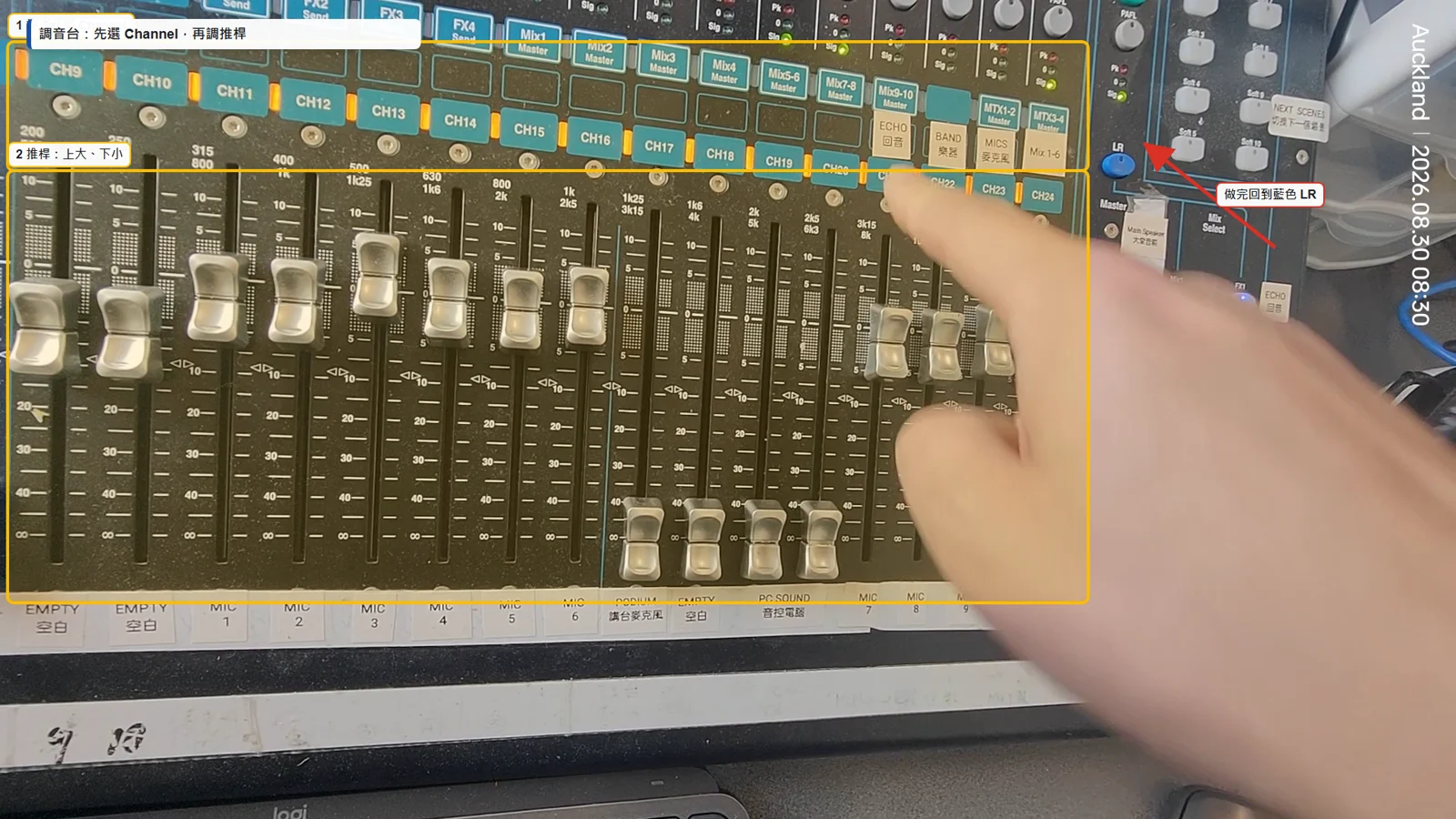
三步:按 Sel 選 Channel → 確認 Mute → 慢慢推推桿。做完回到藍色 LR。
Three steps: Select channel → check Mute → move fader slowly. Return to blue LR.
不是背按鈕,而是先懂兩條路:聲音從哪裡來、混到哪個音箱;畫面從哪台電腦來、送到哪台螢幕。
Do not memorise random buttons. Follow two routes: where audio comes from and where it is mixed; where video comes from and which screen receives it.
先開 Mixer PC 與 PPT PC;密碼向負責同工索取。
Start Mixer PC and PPT PC first. Ask the AV lead for the password.
大堂三台電視、外面兩台電視;沒畫面時選 HDMI 2。
Turn on three hall TVs and two outside TVs. If blank, choose HDMI 2.
兩台都開 OBS;Mixer PC 再開控制面板。
Open OBS on both PCs, then the control panel on Mixer PC.
儲物間門打開;所有電視關機;空調關機;音控臺電腦關機;Mixer 按 Soft Key 1 靜音。
Open the storage-room door; turn off all TVs and air conditioning; shut down the AV computer; press Mixer Soft Key 1 to mute.
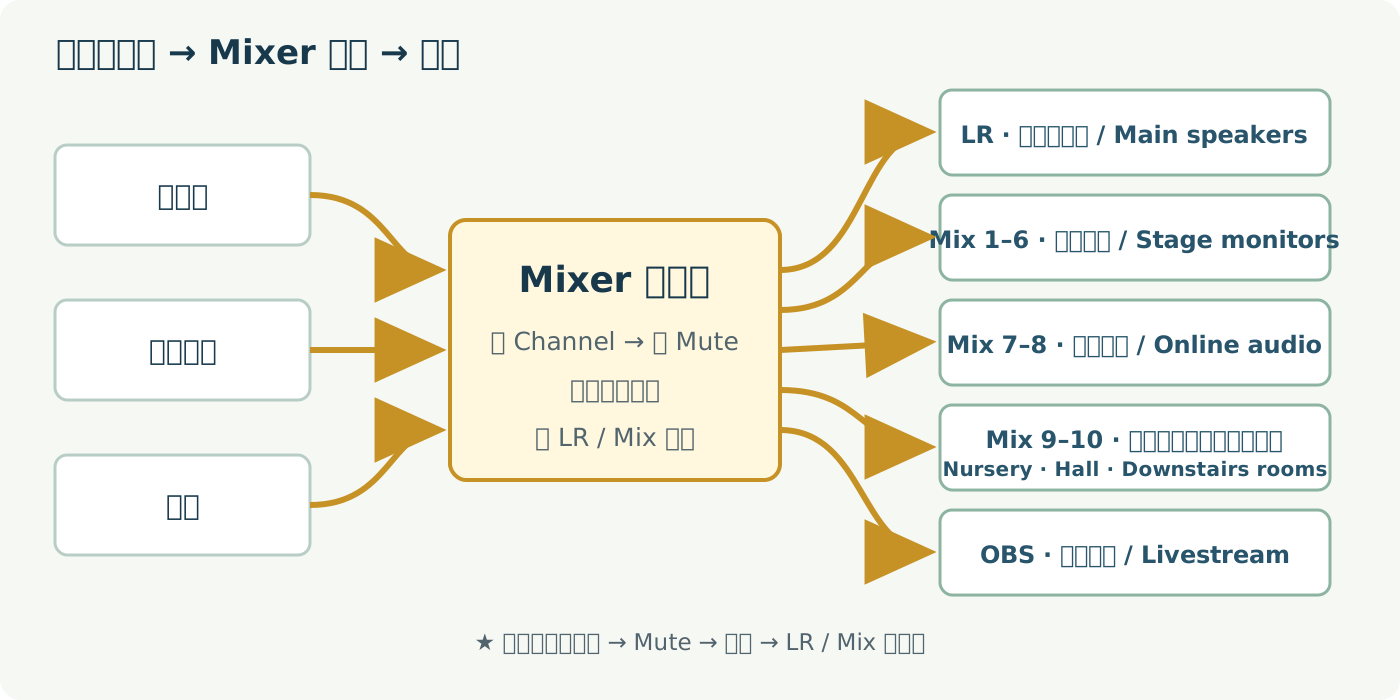
生活比喻:Mixer 像郵局。Channel 是寄件人;LR、Mix 1–6、Mix 7–8、Mix 9–10 與 OBS 是不同收件地址。
Think of the mixer as a post office. Channels are senders; LR, Mix 1–6, Mix 7–8, Mix 9–10 and OBS are different delivery addresses.
三步:按 Sel 選 Channel → 確認 Mute → 慢慢推推桿。做完回到藍色 LR。
Three steps: Select channel → check Mute → move fader slowly. Return to blue LR.
測音直接說話,不要拍打。紅燈是靜音,綠燈是開啟。放回充電座前先靜音。
Speak to test—do not tap. Red means muted; green means on. Mute before docking.
它給線上觀眾聽現場氣氛,不是給大堂音箱。不要隨便推到 LR,會回授尖叫。
It sends room ambience online, not to hall speakers. Do not push it into LR—it may feed back.
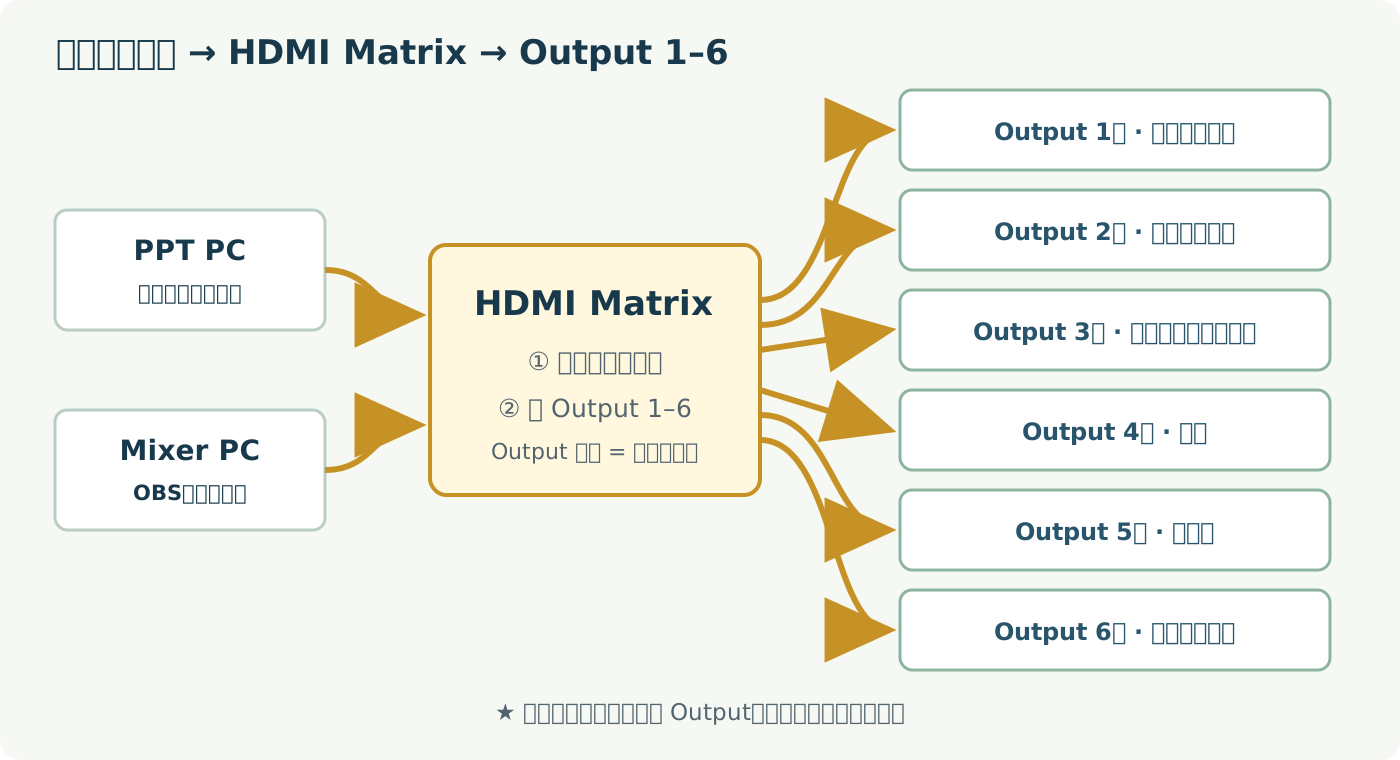
生活比喻:先選「哪個畫面」,再按 Output 1–6 指定「送去哪台電視」。
First choose the picture source, then press Output 1–6 to choose its destination screen.
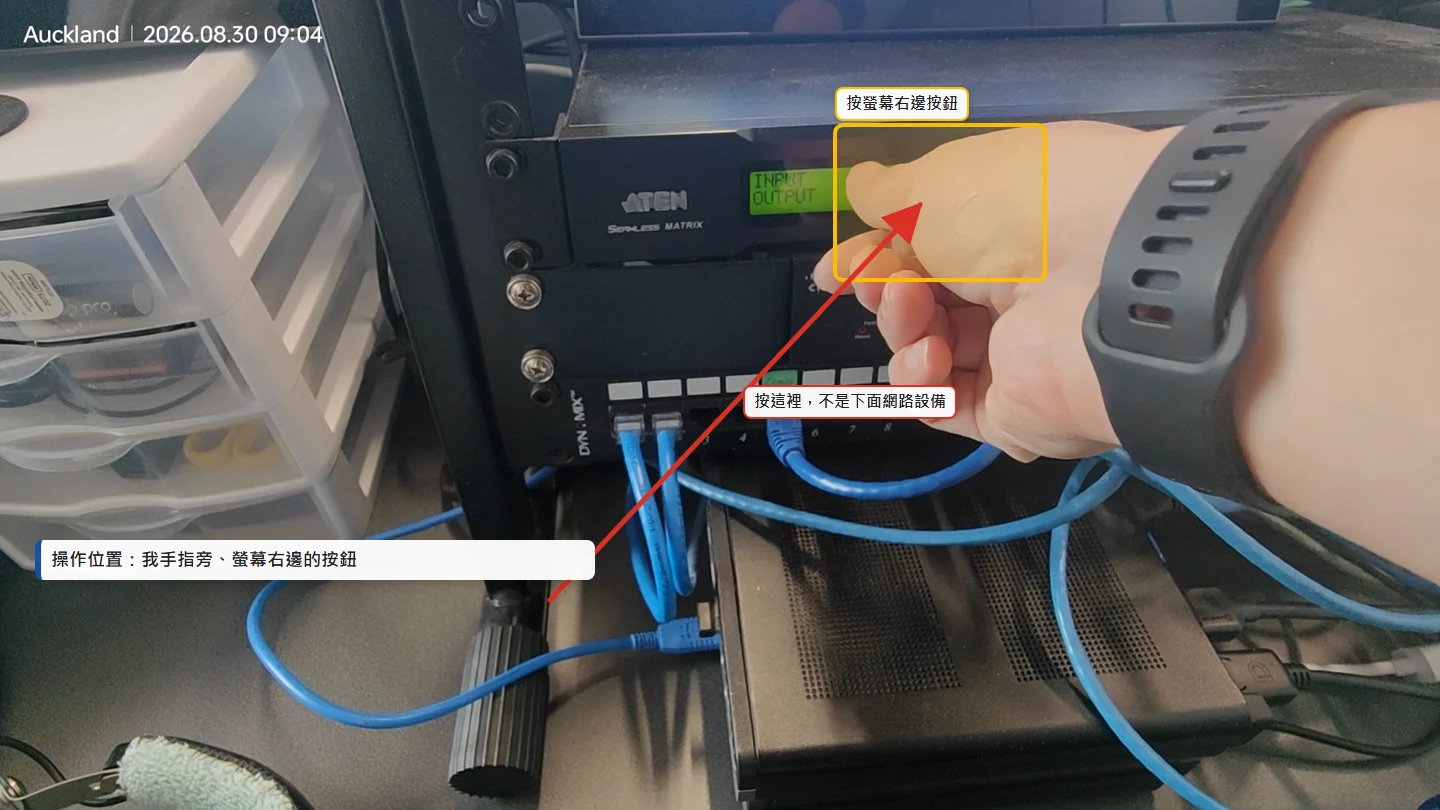
按我手指旁、螢幕右邊的按鈕;下方網路設備不是操作位置。按完後看螢幕確認。
Use the buttons beside the display where the finger points—not the network unit below. Confirm on the display.
主要送程序、歌詞、讀經及證道簡報。
Main source for programme, lyrics, Scripture and sermon slides.
主要跑 OBS、直播控制及需要送出的電腦畫面。
Runs OBS, livestream controls and computer images that need routing.
下載當天程序 PPT → 建日期資料夾 → 開檔 → 預覽全部頁面與音訊。
Download today’s programme → create dated folder → open it → preview slides and audio.
先選 Channel,再確認 Mute、推桿及 LR / Mix 去向;每次只改一項。
Choose the channel, then check Mute, fader and LR / Mix routing; change one thing at a time.
敬拜用 Worship;證道用 Preaching;全螢幕簡報用 PPT。切換後看預覽。
Use Worship, Preaching or PPT scene, then verify the preview.
直播按鈕不能重複按。直播成功的前提是選對直播 Stream Key,並已提前建立 YouTube 預告;YouTube 預告由相關同工提前做好。
Never press the livestream button repeatedly. A successful stream requires the correct Stream Key and a YouTube scheduled event prepared in advance by the responsible coworker.
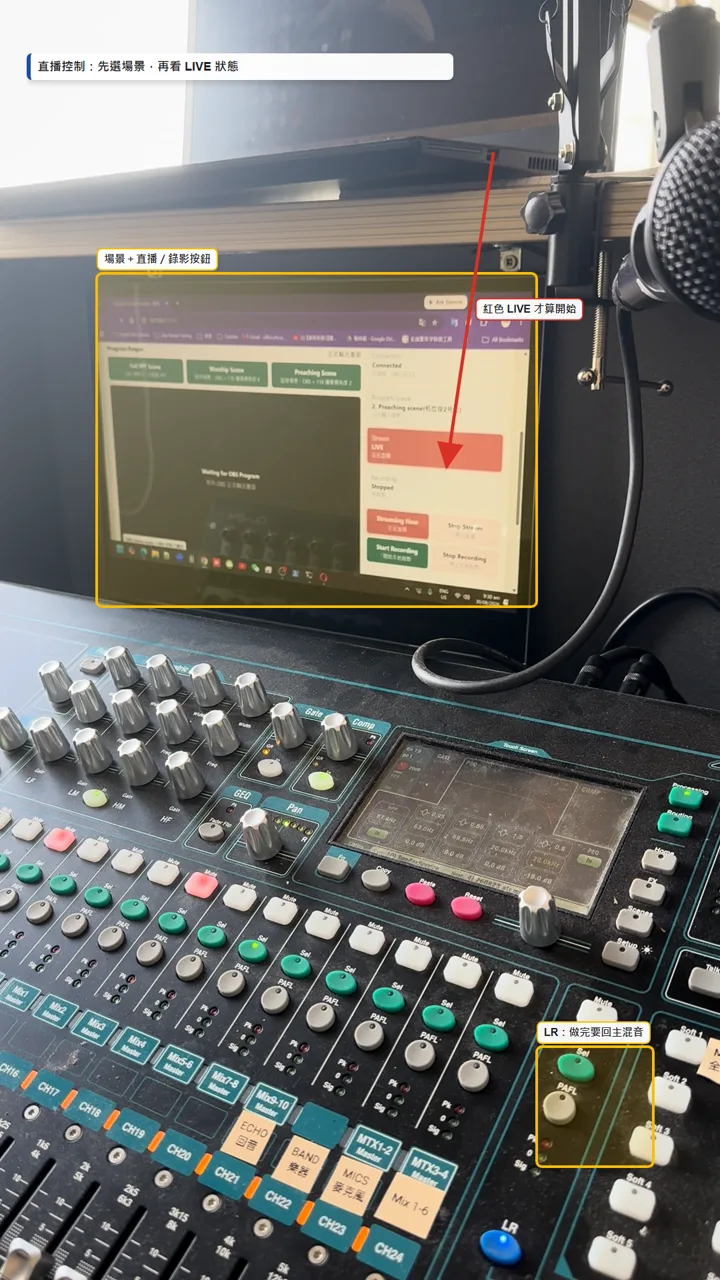
場景、直播與錄影集中在控制頁;直播按鈕只按一次,不要重複按。
Scene, stream and recording controls are together; press the livestream button once only.
切到 Preaching;依現場設定調整 Room Mic 給線上,完成後回 Worship 或下一個程序。
Choose Preaching; set Room Mic for online listeners, then return to Worship or the next item.
先按 Start Recording 做本地錄影,再處理直播,避免整場沒有記錄。
Start local recording first, then troubleshoot the stream so the service is still captured.
電視 Source(來源)→ HDMI 2 → Matrix Input → Matrix Output。
訊號燈 → Mute → 推桿 → LR / Mix 去向。
先降推桿或全靜音;別把 Room Mic 送進大堂主音箱。
Lower the fader or mute all; keep Room Mic out of the hall LR mix.
每支影片已降低背景雜音、保留主講聲、嵌入繁中+英文字幕;YouTube 另有可開關的繁中及英文字幕。
Each lesson reduces background noise, keeps the presenter’s voice, burns in Chinese + English subtitles, and includes switchable Chinese and English caption tracks.